How to do an annual review of your health insurance plan

You should feel confident when you're reviewing your current health plan or picking a new one during Open Enrollment. Take 20 minutes — about 5 minutes for each step — to understand your costs, plan for the future and make sure you still have the right health plan for your needs. An annual review of your health plan can save you time and money in the long run and help you feel more comfortable navigating your health insurance.
1.
Make sure your provider is in-network
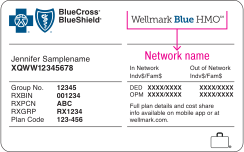
During your annual review, make sure your providers accept your plan and are in-network. Most health insurers make this information available online or in your patient portal, but you can call your provider's office and ask, as well. Wellmark members can find the name of their network on their Wellmark ID card.
Log in to myWellmark® to verify your current provider is in-network or search for a new one.
If the provider you choose is not in your plan's network, you will have to pay more for out-of-network care or find a new provider.
Use myWellmark during your annual review
myWellmark makes it easy to find in-network providers, track your spending and check your benefits from anywhere. Get a clear view of what you’ve spent and what’s covered — no surprises.
2.
Determine how much you are currently spending on health care
When planning for future health care needs or for a better understanding of your current plan, it’s helpful to check in on your current health care spending. You can also see which benefits you’ve used most in the past year and compare them to your annual review from the year prior.
Insider tip!
Pay close attention to the amount you owed for each service. This amount includes what you paid toward your out-of-pocket maximums, copayments and/or coinsurance. It also includes what you paid toward your deductible, if you have one.
3.
Consider future spending
You’ll also want to factor in the cost of future health care expenses you know about. Like if you plan on growing your family or anticipate having a medical procedure done. Review your plan details to make sure you're choosing health coverage that keeps your costs low. You can also use myWellmark to get an estimate for how much a medical procedure will cost you.
All you have to do is:
- Log in to myWellmark.
- Click on the Care & Costs tab.
- Click Find Care.
- Click Medical Costs and Continue, when prompted.
- Select Estimate your costs and type in a medical service to get your estimated out-of-pocket costs, according to your plan benefits.
4.
Plan for the cost of prescription drugs
Prescription drug prices are on the rise, so it’s more important than ever to know how much you’re spending on them. Check to see if your prescriptions are covered, and find out how much each will cost:
- Log in to myWellmark.
- Click on the Care & Costs tab.
- Click Drug Estimates and Continue, when prompted.
- You’ll then be able to search for drugs by name or NDC ID.
Register for myWellmark to get started
Register for myWellmark today — it only takes a few minutes. You just need your Wellmark ID card. myWellmark is your one-stop-source for all of your personal health care information, where you'll find easy-to-use tools, resources and insights to help you manage costs and live a healthier life.
Don't have your ID card handy?
No problem. You can register using your Social Security number too.